Turning Datadog's command palette from a basic page navigator into a unified search, navigation, and action layer — shipped to 38K+ active users across every product.
Cmd+K already had 38K active users and 80% selection conversion. The problem wasn't adoption — it was ceiling. Engineers had outgrown what the tool could do.
Datadog is vast: 15+ product areas, thousands of entity types, dozens of investigation surfaces. Cmd+K was the one place where everything was supposed to be reachable. And it was heavily used — engineers opened it dozens of times per shift to jump between dashboards, monitors, logs, and traces.
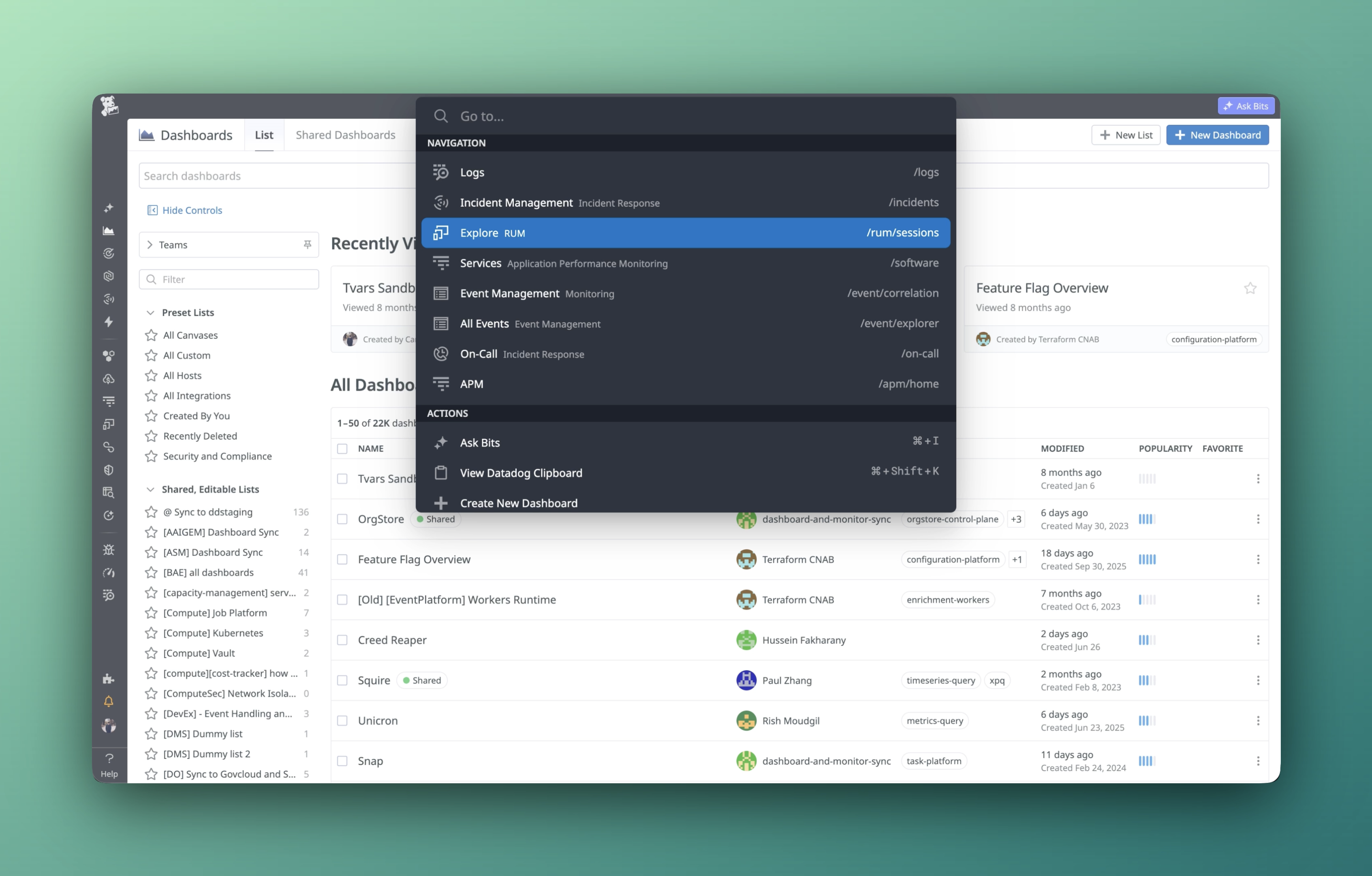
But it was stuck as a page navigator. Results were flat, unranked, and visually identical — a dashboard, a service, and a settings page looked the same. There was no way to scope by product, no contextual actions, and no live entity search. Every query returned the same static list regardless of where you were in the product or what you were investigating.
The tool had strong signal that it mattered. What it needed was an opinion about what mattered most.
I ran an internal workshop across Datadog engineering. Eight pain points. One root cause: Cmd+K was a list, not a tool — it showed you everything and helped you with nothing.
Workshop with engineers across product areas surfaced 8 distinct issues — but all traced back to the same thing: a flat, unsorted list with no ranking, no intent awareness, and no context about where you were in the product.
Zero. A dashboard, a service, and a settings page all looked identical. Users couldn't tell what they'd get before clicking — which meant they clicked cautiously and frequently got the wrong thing.
No ability to scope by product, surface contextual actions, or search live entities. Engineers in APM and Security got identical results — the tool had one mode for everyone, regardless of where they were or what they were investigating.
From internal workshop to working prototype to shipped product — using a code-first approach that let stakeholders interact with real data instead of static mocks.
Ran a cross-functional workshop with engineers across product areas. Collected structured feedback from internal users on pain points, workflows, and aspirations. Identified 8 core issues across UI, UX, and vision categories.
Instead of static mocks, I built a fully functional prototype with real API integrations across 12+ Datadog endpoints. Real data. Real keyboard navigation. Stakeholders could use it, not just look at it — which compressed the feedback loop from weeks to hours and made the design conversation immediately productive.
Ran internal research with Datadog engineers. Iterated on feedback — added product pill filters, improved entity search ranking, refined visual hierarchy. Shipped behind feature flag, then GA to all users.
Seven decisions that turned a page navigator into a command layer. Each one addressed a specific gap — together they changed what Cmd+K meant.
The old Cmd+K had a fixed structure: Recents → Actions → Pages → Entities. That order was designed once and never reconsidered. The new model surfaces results based on your current page and usage patterns — if you're in APM, APM results rank higher. If you just edited a dashboard, that dashboard surfaces first. Intent shapes the list, not a preset template.
Pages, entities, and actions each have their own visual treatment — different icons, colors, and metadata display. Users instantly recognize what they're looking at before clicking. No more guessing whether a result is a dashboard, a service, or a settings page.
Scope results to Dashboards, Monitors, Logs, APM, Incidents, and 15+ other product areas with one click. The shortcut Ctrl+Cmd+K auto-filters based on your current page — open it in Logs, get Logs results. The behavior power users already expected from tools like VSCode, applied to the breadth of Datadog's surface area.
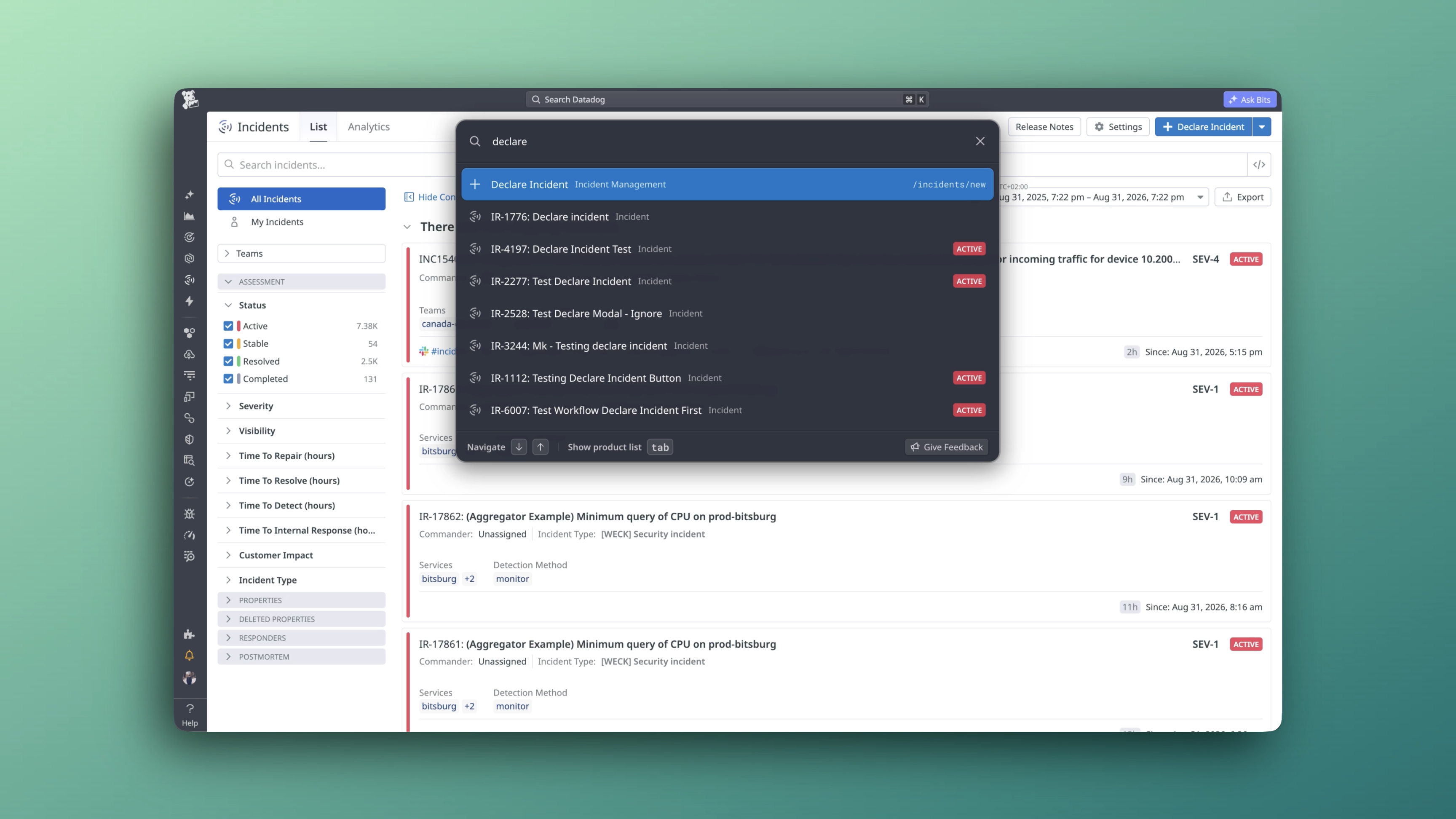
"Create New Dashboard," "Declare Incident," "Create New Notebook" — actions appear contextually based on your current product area. Cmd+K stops being just a way to find things and becomes a way to do things. From navigator to command palette.
Real-time search across 12+ API endpoints — dashboards, monitors, notebooks, incidents, SLOs, services, integrations, teams, users, and more. Results are merged, deduplicated, and ranked. No more hoping the thing you need is in the static command list.
A full-screen visual grid of every Datadog product, organized into 7 sections — Observability, Digital Experience, Security, Software Delivery, Platform, Service Management, and Mobile. Built for the use case Cmd+K couldn't serve well: when you don't know what to type because you don't know what exists. Browse instead of search.
I built a fully functional prototype with live API integrations and real Datadog data — not static mocks. Stakeholders tested the actual experience during reviews, not a simulation of it. That shifted feedback from "we're not sure how this feels" to precise, actionable direction. Parts of the prototype shipped directly to production.
Shipped to all Datadog users. Cmd+K went from a navigation shortcut to the surface where search, action, and AI now converge.
The most-used navigation surface at Datadog — and still growing. Cmd+K is now the default entry point across all products, replacing the old search bar.
4 in 5 sessions end with the user finding and acting on what they needed. A strong signal that the ranking and result quality are working.
One surface. Every product. Dashboards, monitors, incidents, SLOs, services, notebooks, teams — all searchable in real time, from a single keystroke.
A working prototype with live API integrations replaced static Figma flows. Stakeholders tested real interactions — compressing iteration cycles and resulting in parts of the prototype shipping directly.
Cmd+K is now the surface for inline AI queries, intent detection, and contextual commands — the roadmap for Cmd+K as an answering engine.
Replacing the old search bar across all Datadog products. Product Map, org switching, and clipboard integration all live here now.